
Shape the future of capital markets
EXPLORE OPEN ROLESH1 2026 STOCK MARKET PERFORMANCE REVIEW
LEARN MORELEND OR
BORROW
SHARES
Discover More
OPEN A
CDS
ACCOUNT
Discover More
Market
INSIGHTS
Learn more


CDSC started operations in November 10, 2004

CDS Account Opening & Maintenance
Through licensed Central Depository Agents (CDAs), we open and maintain up-to-date investor records in the Central Depository System (CDS) for purposes of investing in Shares and Corporate Bonds.

Custody and Record Keeping
We hold your securities (shares) in safe electronic custody within our centralized depository system, with precise ownership records maintained and reconciled to global best-practice standards.

Clearing and Settlement
We provide secure, automated post-trade processing that ensures buyers of securities have the shares transferred to them upon confirmed payment while sellers receive their expected financial dues minimizing counterparty risk and enhancing market integrity.

Corporate Actions Processing
We facilitate the accurate execution of corporate actions including bonus issues, rights issues, share splits, consolidations, and other capital restructuring events. As the CSD, we also determine and maintain the official register of eligible shareholders as at record date, ensuring issuers and their agents administer investor entitlements like dividend payments efficiently and transparently.

Securities Lending and Borrowing (SLB)
Our regulated SLB framework enables the temporary transfer of securities between investors through SLB Agents to generate additional income to investors, support short-selling, enhance liquidity, and improve price discovery within a structured risk-managed environment.
Securities Transfers
We process private transfers (own account transfers and gift transfers), off-market transactions, as well as transmissions relating to deceased estates with strict verification controls, ensuring lawful, transparent, and efficient change of ownership.
Shares Pledging
We facilitate the electronic marking and release of pledged securities within the depository system, providing lenders with secure collateralization and investors ability to access credit at competitive rates while preserving accurate ownership records.

Share Immobilization
CDSC facilitates the immobilization of physical share certificates by converting them into secure electronic records within the central depository system. This process eliminates the risks associated with paper certificates such as loss, theft, or damage while enabling seamless participation in Kenya’s capital markets.
Guarantee Fund Management
CDSC administers the settlement guarantee established to uphold the integrity and stability of the securities market by providing an additional layer of protection against settlement default and reinforcing confidence in Kenya’s capital markets.





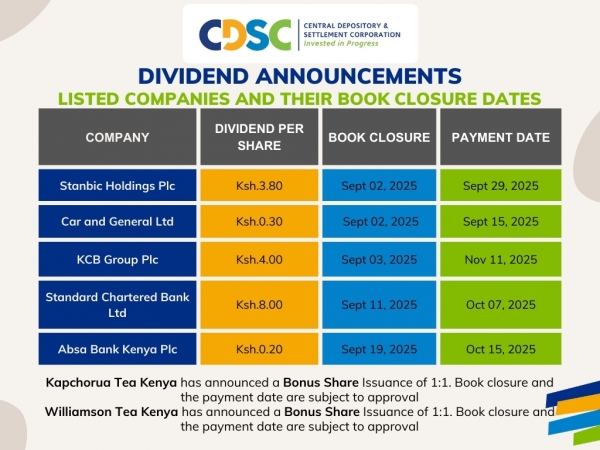
Find the updated list of companies paying dividends in September and October 2025...
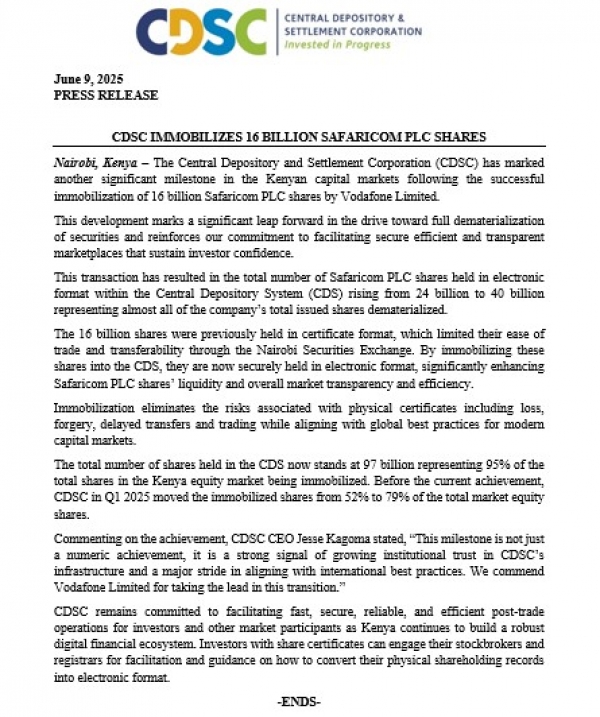
Nairobi, Kenya – The Central Depository and Settlement Corporation (CDSC) has marked another significant...
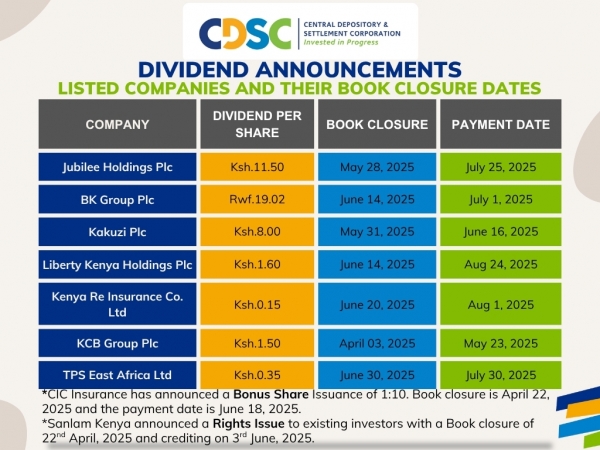
Multiple companies have announced dividend payments after posting positive financial results.
Find...